
Gemini for macOS Introduces New Voice Features and Screen Awareness for Better Productivity

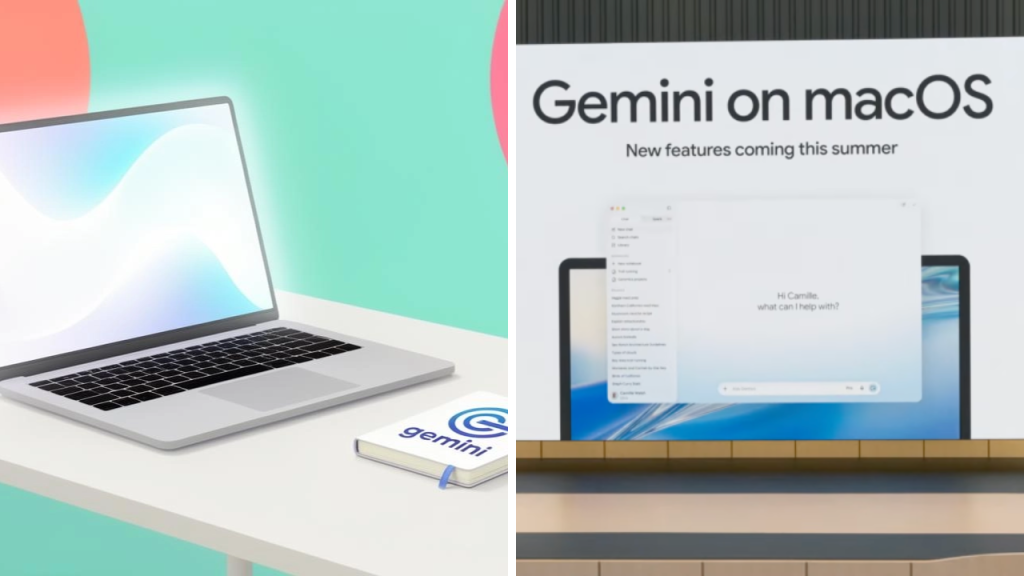
Google is reportedly adding new voice capabilities and screen awareness to Gemini on macOS, in an effort to make the AI assistant more handy for daily work. The update is said to allow users to interact with Gemini in a more natural way, and will also enable the assistant to comprehend information shown on the Mac display.
 Windows 11 KB5101684: Microsoft Releases Update With 42 Changes and Fixes for Millions of PC Users
The new Gemini for macOS features can help boost productivity for users who research, write, schedule, review documents and multitask. Gemini would combine voice commands with the context on the screen, potentially removing the need for users to copy and paste information between applications before asking for help.

Gemini Is More User-Friendly With Voice Interactions
The biggest new feature is probably the expanded voice support.

Instead of typing out every prompt, users could speak to Gemini directly. This makes it easier to ask questions, create summaries, write messages or organise tasks when working in another app.
 Samsung Galaxy Users Report Battery Drain and Overheating After Installing the Latest Update
Voice interaction is especially useful when you’re doing video editing, writing documents, coding or anything else that involves the keyboard and mouse. A more conversational experience might also allow users to complete simple tasks faster.
The quality of the experience depends on how accurate the microphone is, how many languages are supported and how Gemini responds to interruptions or follow-up questions.
More context: Screen Awareness
Screen awareness is going to be another key part of the macOS experience.
With the right permission, Gemini could read visible text, images, browser pages, documents or application windows. This way users could ask what is currently on the screen without having to upload a screenshot or copy content manually.
Gemini, for example, can read a chart, sum up a long document, highlight important information in an email or suggest improvements to text on screen.
This would have the appearance to the assistant of being a part of Mac, and not a separate chatbot window.
“Productivity Processes Could Speed Up”
Adding visual context to voice control could be a way to help users complete routine tasks in fewer steps.
If a user is looking at a report, they can ask Gemini to summarise what they see. If you are presenting you might want to ask for shorter version of the text on screen It lets developers ask for an explanation of an error message without re-typing it.
These may also help research, allowing users to compare information on open tabs or pull out highlights from long pages.
But how useful those tools will be will depend on how well Gemini understands the spoken request and what is on the screen.
Controls over privacy will be important
The screen-aware AI feature also raises serious privacy issues.
Users will get simple controls to let Gemini know when it can gaze at the screen, what apps it can tap into and whether information is being processed locally or sent to servers in the cloud. Sensitive information such as passwords, private messages, financial data and confidential work files need added security.
Generally macOS prompts the user to explicitly allow screen recording, microphone access and accessibility. Gemini’s implementation will need to conform to these system controls and allow users to easily turn off access when it’s not needed.
Availability by country and account varies.
Not all Mac users will get the features rolling out at the same time.
AI tools from Google are typically rolled out gradually and will be available depending on region, language, account type, subscription level and device compatibility. Some features are first made available to Google AI Pro or Workspace customers and are later released to general availability.
You should also verify if a particular macOS version is required and whether the features work on Intel-based Macs and Apple silicon models.
Google brings Gemini to more devices to
That macOS update is part of a larger effort by Google to bring Gemini to phones, browsers, productivity apps and desktop systems.
Google Gemini’s screen awareness and voice interaction could make it a more competitive offering compared to other desktop AI assistants. Mac users who want to jump to summaries, writing help, visual analysis and general assistance more quickly without having to constantly switch between applications may be interested in the update.
The final list of supported devices, features, privacy settings and rollout timeline will be confirmed in official Google documentation.
Sources
- Google Gemini – Product information and features announcements.
- Google Workspace Updates – Gemini productivity feature launch information
- Google Support – Setting up, permissions and compatibility
- macOS – microphone, accessibility and screen recording permissions – Apple Support
- The Verge – The desktop software & AI tools coverage.
- TechCrunch – Google Gemini, AI assistants and productivity tech news
