
iPhone Driver’s Licenses Expand to Another US State With New Digital ID Support

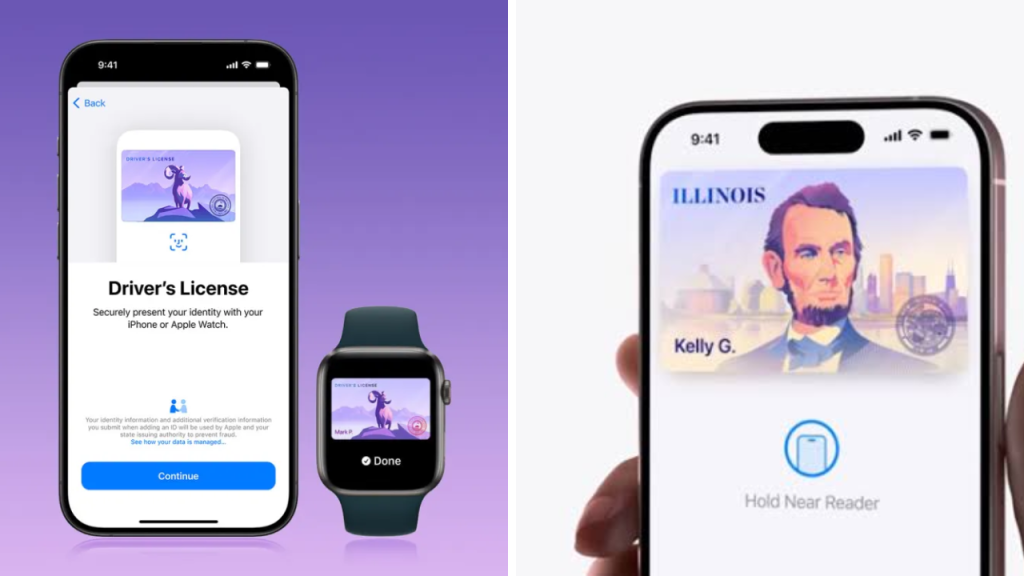
Apple has seemingly expanded its digital ID programme to another US state, allowing eligible residents to add a driver’s license or state ID to the Wallet app on supported iPhones and Apple Watches. The change allows more people to show ID without having to immediately reach for a physical card.

The iPhone driver’s license feature rollout is the latest indicator of growing interest in mobile identity systems across the U.S. Enrolment is still limited and residents should wait for confirmation from their state’s motor vehicle agency before attempting to enrol.

Add your digital ID to Apple Wallet
If you’re an eligible user, you’ll usually be able to begin the setup process in the Wallet app.

Users can also add a driver’s license or state ID, be prompted to scan both sides of their physical card and take a selfie, and make facial or head movements to confirm their identity. Then, the information is reviewed by the state agency involved.
Approval is not guaranteed and certain applicants may be required to follow additional verification steps.
iPhone, Apple Watch Displayable ID
Once approved, the digital ID could be on an iPhone that is paired with an Apple Watch.
Supported identity readers allow users to share specific information without revealing or unlocking the whole device. Usually you need Face ID, Touch ID, or some other kind of secure authentication.
The system is designed so that it only shares the information needed for a specific request, not all the details on the physical license, Apple says.
Airport Use Still a Big Benefit
Digital IDs are also frequently used to confirm identity at participating Transportation Security Administration checkpoints.
“Travellers will just be able to hold their iPhone or Apple Watch up to supported airport readers. However, availability varies by airport and checkpoint, so travellers shouldn’t expect that the feature will work everywhere.
Travellers may still need a physical identification card for backup purposes, especially in the event of technical problems or at locations where compatible equipment is not available.
Why the Physical Driver’s License Matters
Supporting digital IDs doesn’t have to mean replacing a physical driver’s license.
Drivers may still need to use the old card during traffic stops, at businesses that do not have digital readers or when travelling outside of participating areas. Local law and agency rules determine acceptance of a mobile credential.
Until state officials provide clarification, users should continue to carry their physical license.
Privacy and Security Still Top Issues
Concerns about data collection, loss of device and third party access are raised by digital identity systems.
Apple has built its system for encrypting and protecting identity information through device authentication. Users should keep using a strong passcode, keep iOS up-to-date and turn on Find My if ever the device is lost or stolen.
Residents also should avoid third party apps or websites that claim to add a government ID to Apple Wallet.
Sources
- Apple Wallet – Digital Driver’s Licenses & State IDs Official Info
- Apple Support – Setup instructions, eligibility and requirements for devices.
- Participating State Motor Vehicle Agency – Official Rules for Registration and Acceptance
- Transportation Security Administration – Guidelines on airport identity verification;
- Department of Homeland Security – Digital Identity and Security Data.
- State Government Website – Confirmed start date and resident requirements.
