
Google shuts down Pixel Studio app moves users to Gemini and Nano Banana

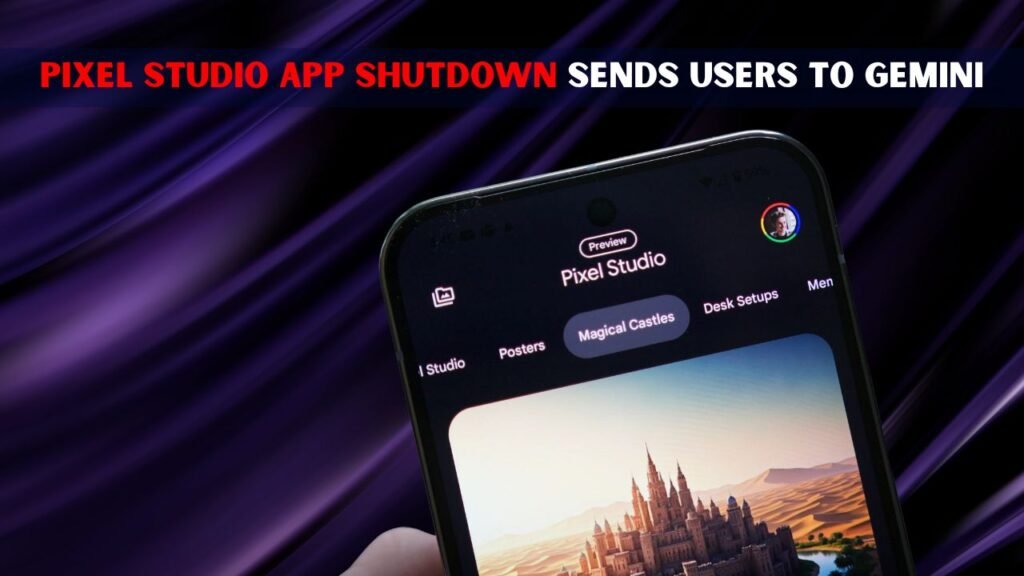
Google kills Pixel Studio as a standalone app for AI image generation and is pushing users to Gemini with Nano Banana. Pixel Studio launched with Pixel phones to help users create images, stickers, wallpapers and quick edits with AI. Instead of keeping a small Pixel-only app alive, now Google wants to bring that same creative work to a bigger place. According to reports, the latest Pixel Studio update removes the ability to create images and stickers, and displays a prompt to users to try Nano Banana in the Gemini app. Google has also said it will redirect users over time and provide an export tool for old creations. It’s a change that might take away the special feeling of a phone-exclusive app for Pixel users, but it also gives them a broader AI image tool, connected to Gemini and Google’s larger AI future for faster updates and more creative support.
 Roku Increases Streaming Hardware Prices Again With New Lineup Changes Affecting Millions of Users
Why Google is shuttering Pixel Studio
Google’s move seems to be a straightforward effort to simplify its AI product lineup. Pixel Studio was helpful, but was mostly a Pixel feature. Gemini is a larger platform to bring a lot of Android users, web users and paid subscribers together in one place. Moving image creation to Nano Banana allows Google to update one powerful tool rather than maintaining separate tools with similar jobs. It also helps Google to promote Gemini as the main place for writing, planning, editing images, and creating creative content. To users, the change may feel abrupt, especially since Pixel Studio was marketed as a special phone feature. But Google still seems to believe Gemini can deliver more powerful models, more refined edits and more frequent upgrades across more Google products.

- Google wants a single main place for its AI image tools.
- Pixel Studio was exclusive to some Pixel phones.
- Gemini can reach more users on devices.
- Nano Banana is updated with features more quickly.
- This move cuts down on duplicate AI apps.
What will happen to current Pixel Studio users
Current Pixel Studio users need to know that the app isn’t going away in one neat moment for everyone. There are reports of a slow change and the latest update removes core features for creating AI and directs people to Gemini. There may still be some basic editing parts, like simple screenshot editing, but the main creative tools are not the focus for now. Integrations using the Pixel Studio should continue to work during the transition, Google said. The company will also be adding an easy export tool that will allow users to save their previous creations. This is important as a lot of people used Pixel Studio for their personal art, stickers and quick design experiments before they would take their work to Gemini and Nano Banana later on.

- If you’re not signed in yet, you might see a prompt to open Gemini.
- Image and sticker making might not work any longer
- A few basic editing tools may stay for now.
- Google will provide an option to export.
- Store older creations safely.
Why Gemini and Nano Banana Are the New Targets
Gemini and Nano Banana provide Google with a more robust path as they are not limited to one phone app. Inside Gemini, Google’s image generation and photo editing model is called Nano Banana . Google describes Nano Banana as a tool for generating high quality images, editing photos and trying out different styles from prompts. This is part of a larger Google initiative to make Gemini a central assistant for everyday life and creative pursuits. Google can keep everything in one place instead of asking users to open Pixel Studio for images and Gemini for other AI jobs. This can speed up updates, reduce confusion, and make it easier for new users to find image tools. And it’s enabling broader access beyond the Pixel-only experience for many more people online.
- Gemini is Google’s AI hub in the making.
- Nano Banana supports image generation and image editing.
- Users can write prompts to generate visuals.
- The tool goes beyond the limits of Pixel Studio.
- Google can do better with one platform.
What Pixel owners can do now
For pixel users, this change is more of a migration than a shutdown. Your best bet will be to check Pixel Studio, export any saved creations when the tool is available, and learn how to use Nano Banana in Gemini. Sticker, wallpaper and AI art lovers should try similar prompts in Gemini and compare results. They should also make sure to keep the Gemini app up to date since Google will likely add creative features to it first. The only real downside is that you lose a dedicated Pixel-only area. The upside is that users could end up with better models, more features and a tool that works across Google services. So it’s worth knowing about the switch before the app becomes less useful for creation in the future.
Final Discussion
Google’s Pixel Studio shutdown shows how fast AI tools are evolving The company is transitioning from small, device-only features to a single, large Gemini system driven by Nano Banana. It’s a bummer for Pixel fans who enjoyed having a creative app all to themselves, but it does mean users get a more powerful and up-to-date image tool. Smart moves include the export of old creations, learning the image options of Gemini, and following future updates. Simply put, Pixel Studio is going away, but the plan for Google’s AI image generation is getting bigger and more integrated for users around the world.
