
LG Monitor App: McAfee Ads Appear on Windows 11 PCs and Users Are Not Happy

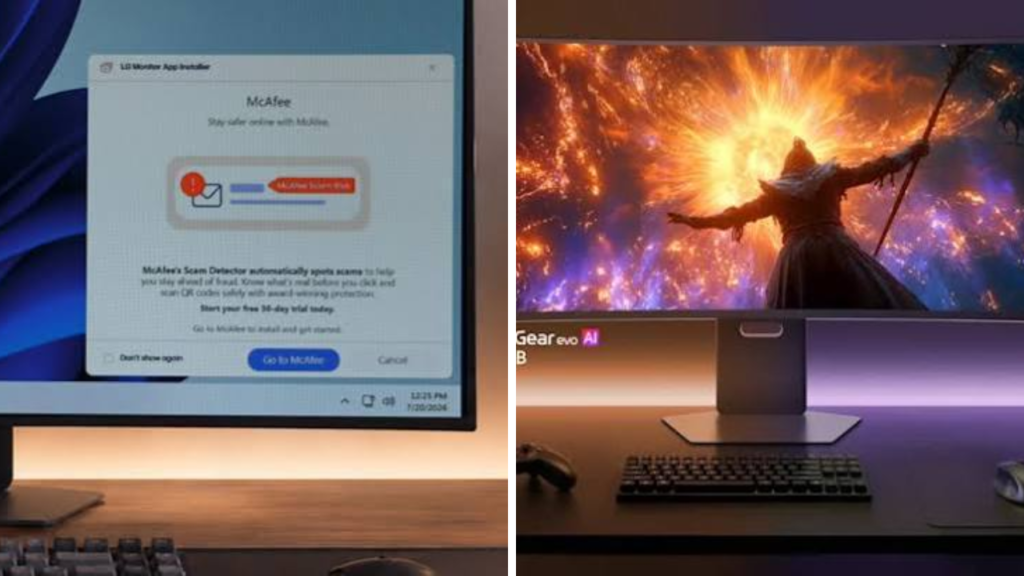
Some Windows 11 users have complained about McAfee ads coming through LG’s monitor management software, with some claiming they’re getting unwanted promotions on their personal computers. The issue garnered attention as many users installed the LG app just to control display settings, not to get offers for third-party security software.
User reports suggest the ads could appear as notifications, pop-ups or promotional messages linked to LG’s companion software. We don’t know which specific apps or versions are impacted, so users should review their installed LG software, notification settings and official support information before changing anything.
LG Monitor App Allegedly Pushes McAfee Promotions
LG supplies Windows applications that allow customers to manage compatible monitors from their PCs. Depending on the model, these tools can control brightness, screen layouts, picture modes, firmware updates and multi-tasking features.
The controversy reported is that one of the utilities is showing McAfee promotions. Users have asked why software that is supposed to control monitors is displaying ads for some unrelated security product.
 Microsoft 365 Teams Outlook and Xbox Live Outage Leaves Thousands of Users Unable to Access Services
The ads don’t necessarily mean that McAfee software has been installed automatically. However, users might find the advertisements a bit invasive, especially when they appear outside the main LG application window.
Windows 11 users slam unwanted notifications
Much of the frustration seems to be about expectations and consent. Typically, customers install hardware utilities because they need a particular feature for a device. Users may perceive the software as more of an advertising platform when those applications start displaying promotional messages.
Windows 11 users have also complained that the notifications look like system warnings or security alerts. This could result in confusion if the message seems to be urgent or that the computer needs more protection.
When software offers paid promotions, it’s important that the labelling is clear. Users should be able to distinguish between a genuine security alert, a Windows notification, and an ad.
Why You Might See McAfee Ads
The upgrades could involve a commercial relationship, a software package or an advertising component within the LG application. This is common in the PC industry where device manufacturers and software companies offer trials or subscription services.
But users often react badly to those offers when they pop up unexpectedly after installation with no proper explanation. If the advertising is repeated over and over or is difficult to turn off , the reaction can get stronger .
LG and McAfee need to provide official details about how the promotions are being delivered and whether all users are affected.
How to Disable Ads
If you are affected, start by opening Windows 11 Settings and checking notifications under System. You can turn off all notifications for the respective LG app, but then you will also not receive useful notifications, e.g. about firmware updates.
Users should also open the LG monitor app and check the preferences for marketing messages, recommendations, special offers or promotional notifications.
If you do not need the software, you can uninstall it from Settings, Apps and Installed apps. Before uninstalling the programme, customers should verify if it will disable features they use regularly.
You can also reduce the risk of installing unofficial or modified versions by only downloading software from LG’s official support website or the Microsoft Store.
Privacy & Trust Concerns
This situation raises broad questions about advertising in hardware management tools. Customers expect utilities for monitors, printers, keyboards and other devices to focus on the essentials of controls and updates.
Trust can be undermined by unsolicited promotions, particularly when the software is automatically running in the background. A lot of this criticism can be avoided by companies if they make advertising opt-in, ask for permission and provide an easy way to turn off promotions.
With each new hardware, users install companion software and should review application permissions, startup programmes and notification access.
What LG and McAfee Might Do Next
LG could respond by pulling the ads, making them less frequent or providing a clear opt-out option. McAfee may also be able to provide information about whether the promotions are part of an official campaign and how they handle customer data.
Companies will share more info, but Windows 11 users should stick to official support channels and avoid clicking on ads they don’t recognise.
Sources
- LG Support – Official software downloads, monitor utilities and customer support information.
- Microsoft Support – Help with Windows 11 notifications settings and app management.
- McAfee Support – Security product information and consumer software info
- BleepingComputer – Tech Support & Security News, How-To Guides, and Downloads.
- The Register – Reporting on enterprise technology and the software industry
