
Samsung Galaxy S26 Ultra Users Report Red Tint Display Issue After Recent Software Update

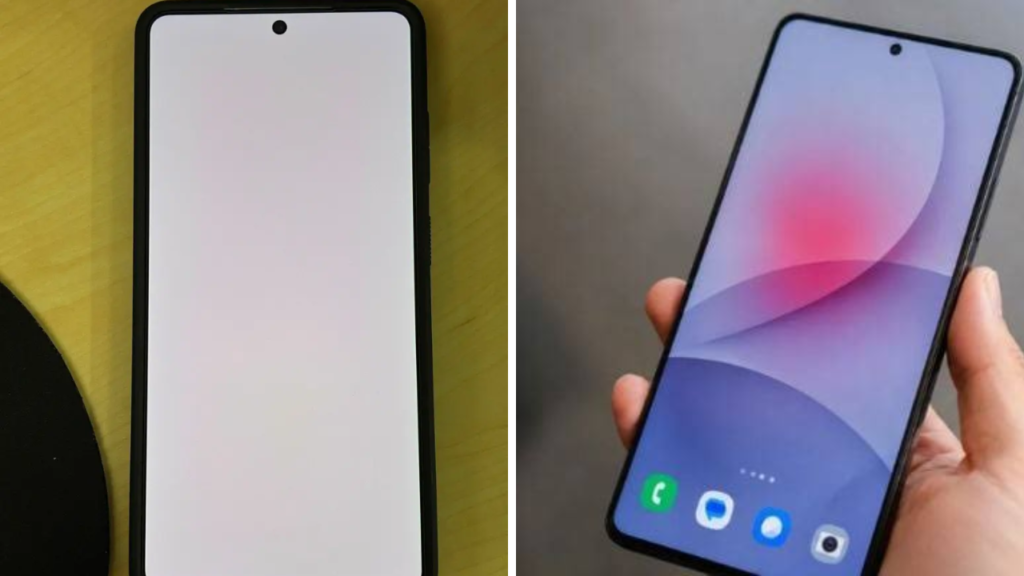
Some owners of the Samsung Galaxy S26 Ultra have reported a reddish tinge on the screen after a recent software update. The community forums and social media chatter suggest the problem is related to the colour balance of the screen, which is showing a warmer (read: more reddish) display than expected. Not all devices seem to be affected, but the reports have drawn attention as more users share similar experiences. Samsung has yet to say whether the problem is widespread or limited to a certain software build.
 Google Maps 3D Immersive View for Android Auto Makes Navigation Easier During Daily Driving
Problem Happens After Installing the Latest Update
Many users report the red tint appearing immediately after updating their devices. The issue apparently happens at different brightness levels and display settings, leading some to suspect it’s a software bug tied to colour calibration. If it is a software issue, then a future patch could solve the problem, as software updates can alter display optimisation and colour profiles, experts say. There’s no indication of a hardware fault at this stage.
Users attempt short-term troubleshooting steps
In the absence of an official response, some Galaxy S26 Ultra owners have tried temporary fixes such as changing display modes, adjusting colour balance, rebooting the device and clearing the system cache. Some users have seen small improvements, others are still stuck with the problem . The results have been inconsistent. If this affects you, please provide feedback through Samsung’s support channels so the company can investigate and identify possible software-related issues more quickly.
 ChatGPT Outage Lasted About 45 Minutes Leaving Thousands of Users Unable to Access the Service
Official statement yet to be issued
Although there are still reports appearing online, Samsung has not officially confirmed the reason for the red tint problem or announced a fix. Different devices may be affected differently so people should refer to official support information rather than speculation. Samsung will likely decide if the problem is isolated or needs a wider software update as more feedback comes in. Until then, affected users should make sure their devices are up to date and report any issues through official support channels.
 OpenAI First Hardware Device Could Combine Smart Speaker Features With a Personal AI Assistant
Sources
- Samsung News Room – Samsung Newsroom is the official source for software update announcements, Galaxy device support information, firmware releases and official product communications from the company.
- Samsung Community – Samsung Community is the official forum of the company for users to report software issues, talk about updates and share troubleshooting experiences for their Galaxy. It is often helpful to find widespread software bugs before official fixes are released.
- Sam Mobile – SamMobile is a site dedicated to Samsung smartphones, firmware updates, One UI developments and Galaxy software news. It regularly covers beta updates, software bugs, and upcoming firmware releases.
- 9to5Google – Android, Google, and the best of Google services It covers often Android updates, bug reports and manufacturer responses to software issues.
