
Samsung One UI 9.0 update adds network speed indicator and new features

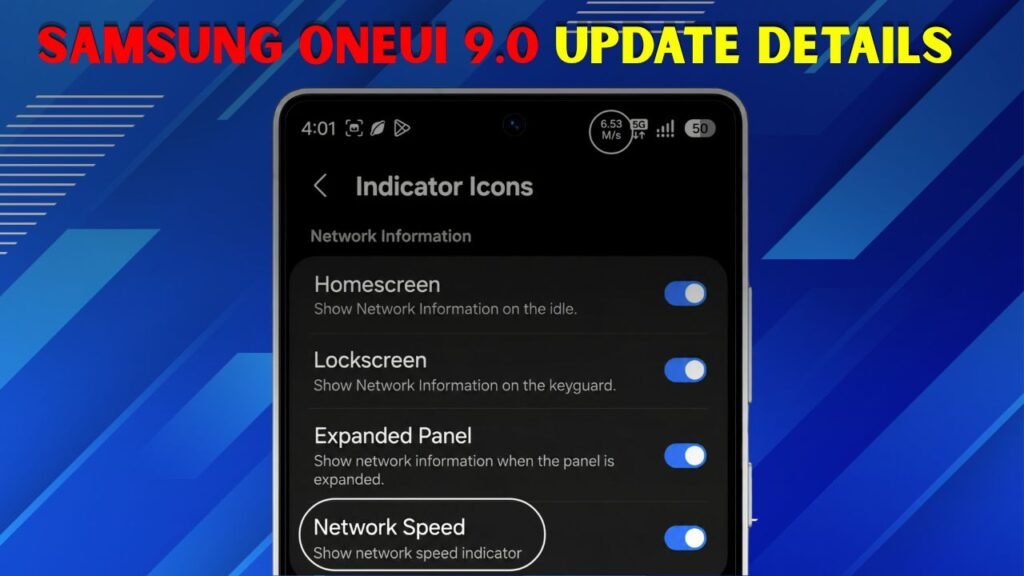
Samsung’s One UI 9.0 is gaining a lot of attention, as reports suggest a highly requested network speed indicator and other useful design, security, and accessibility improvements. The new speed indicator is expected to reflect the live internet speed on the status bar so the users can easily check whether the Wi-Fi or mobile data is working fine. This is especially handy for downloading files, watching videos, playing games, or troubleshooting slow internet. Galaxy users can get a cleaner built in style with Good Lock and QuickStar support instead of opening a third party app. One UI 9.0 also features a more robust Quick Panel control, improved Samsung Notes tools, smarter options in Contacts, enhanced protection against risky apps and more accessible features. Overall, this update seems to be aimed at making Galaxy phones more useful, personal and simple to use on a day-to-day basis, while keeping the interface modern and user-friendly for everyone.

Network speed metre
The most significant feature of the Samsung One UI 9.0 update is the network speed indicator. This option is designed to display the real-time upload and download speed near the status bar icons. This feature has been missed by several Galaxy users as other Android brands already have similar tools. This update makes it easier for users to quickly see if their internet is fast, slow or unreliable without having to open a separate speed test app. It works on mobile data and WiFi so it can be used in a lot of everyday situations. It can also automatically adjust the speed units like KB/s, MB/s or GB/s. So the information still remains easy to read and practical for normal users, even during the normal daily phone use.

- Display live internet speed in status bar.
- Works on Wi-Fi and cellular networks.
- Allow users to check if their internet is slow quickly.
- It reduces your dependence on 3rd party speed apps.
- Improves the Galaxy status bar.
How to Enable This Feature
The network speed indicator is not meant to automatically appear for all users. It is reportedly linked to the Samsung Good Lock and QuickStar module, so users may need to enable it manually after installing the One UI 9.0 compatible version. This adds flexibility to the feature, as those who prefer a clean status bar can leave it off while power users can turn it on. This option helps in download speed, browsing speed, mobile hotspot and app loading issues. It also cuts down on third party speed metre apps that may have additional permissions, show ads or clutter the notification area during everyday practical phone use for students, workers, gamers and frequent travellers.
- Get the latest supported version of One UI 9.0 on your Galaxy phone.
- Download Samsung Good Lock from Galaxy Store.
- Install or update Good Lock in the QuickStar module.
- Go to Indicator Icons in QuickStar settings.
- To display live speed, enable the Network Speed option.
New features in One UI 9.0 include:
And it’s not only about the network speed indicator with One UI 9.0. Samsung is also working on a more personal and easier mobile experience: The Quick Panel needs to be more flexible so that users can control the brightness, sound, media and other buttons easily. Creative Studio could add creative writing tools to Notes and easier creation of profile cards for Contacts. Accessibility improvements make it easier for users to read selected text and control mouse keys. Security is another key part, as the update can warn users about risky apps and help block dangerous installation attempts. These changes make the update useful for everyday users and advanced Galaxy fans who want to have more control, safety and comfort in their everyday lives.

- Quick Panel layout can be more customised.
- Samsung Notes could see more writing tools.
- Contacts can help you create profile cards.
- Accessibility features could be more clear and more smooth.
- Security protection may warn users about risky apps.
Galaxy Phones and When to Get Them
Samsung One UI 9.0 is still in beta, and being rolled out for select Galaxy devices, so not all features may be available to all users at the same time. Availability is subject to model, country, carrier and app support New One UI features are usually first rolled out on the flagship phones. Older and mid-range phones will get them later, if they are eligible. Users should also keep in mind that Good Lock and QuickStar availability may vary by region. That could mean your phone’s network speed indicator doesn’t pop up right away after you update your phone. The safest way to do this is to regularly update the phone software, Galaxy Store apps, Good Lock modules, and Samsung Members information, so you can get access to new tools and fixes over time without a problem.
Final Discussion
Samsung One UI 9.0 is shaping up to be a major upgrade for Galaxy users and the network speed indicator is a major reason for that. This small feature makes everyday internet use easier by displaying live speed without any additional apps. The update is more about usefulness than flash, with Quick Panel changes, creative tools, accessibility upgrades and beefed-up security. Availability may vary depending on device, region and Good Lock support. Users should monitor official updates and turn on the feature when it’s officially released for their Galaxy phone on stable or beta software.
